
Chapter 7: Using AI and Automation Without Losing the Human Touch
Founders and small teams face the same constraint: there are only so many of you. You can't outwork a sales team of ten, produce content as fast as a media company, or personally respond to every prospect at the moment they're most interested.
You don't have to. The traditional alternative, hiring even a junior sales development rep, means a full salary plus benefits and your time managing that person; the automation stack in this chapter costs a few hundred dollars a month, runs around the clock, and never forgets a follow-up.
Technology can multiply your efforts if you know what to automate, what to keep human, and how to avoid the traps that make automation feel robotic. Rather than survey every AI tool (they change too quickly), this chapter shows how to think about AI and automation when time is scarce: what works as of September 2026, workflows that scale without breaking, and the principles that keep your communication authentic even when machines are involved.
Founder-Type Note: Applications differ by business model. B2B SaaS founders benefit most from cold email infrastructure, CRM automation, and AI-powered prospect research at scale. Coaches and creators benefit most from content repurposing, newsletter automation, and community engagement tools. The principles apply to both; the workflows differ, so focus on the sections most relevant to your model.
The Automation Principle: Automate the Predictable, Personalize the Meaningful
Personalization is primary; automation is secondary support. Use automation to support your personalized approach. The worst automation is an obviously templated message written without the recipient in mind; it costs more than it saves.
The best automation handles tasks that are predictable (they happen the same way every time), time-consuming (they eat hours you could spend on higher-value work), and not relationship-dependent (the prospect doesn't care if a human did them).
The worst candidates for automation are tasks that are context-dependent (they require judgment about the situation), relationship-building (the prospect values knowing a human cared), or your competitive advantage (if anyone can automate it, it's not differentiation).
Case Study (composite): Creator automation stack
A creator spent 12 hours a week on prospect research, email follow-up, scheduling, and CRM updates. Folk CRM with AI enrichment, Instantly sequences, Calendly, and Zapier cut that to 2.25 hours a week. The creator put about 5 of the saved hours into customer conversations and content and dropped the rest, which meant 18 conversations a month instead of 8, on a 53-hour week instead of 58.
Before we look at tools, two boundaries: what not to automate, and a trap to avoid.
What NOT to Automate
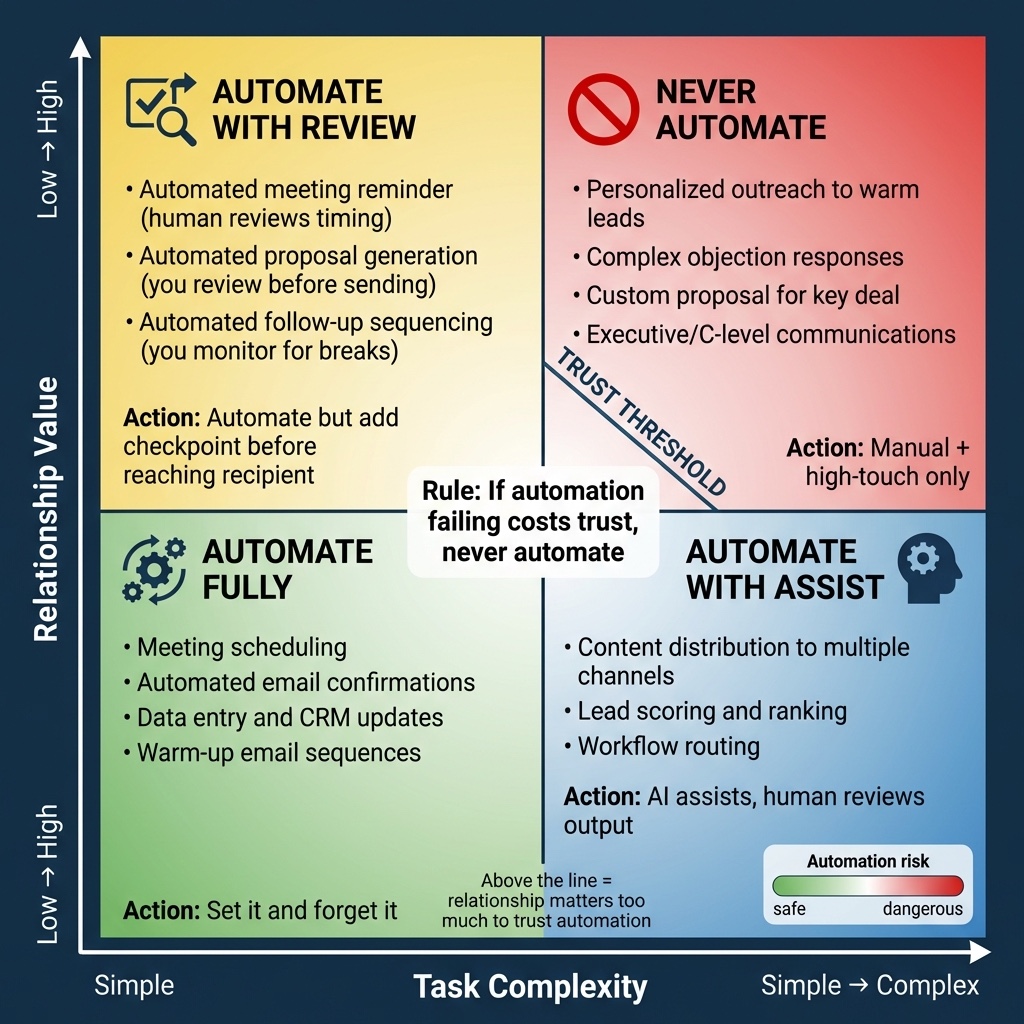
Figure 7.1: The Automation Failure Matrix. Not everything should be automated. This framework helps you decide which tasks benefit from automation (predictable, time-consuming, not relationship-dependent) versus which must stay human (context-dependent, relationship-building, your competitive advantage).
Some things should stay manual, even when you're tempted.
First messages to high-value prospects. Your top 20% deserve personal attention. Automate the research, but write the message yourself.
Responses to replies. Once someone replies, you're in a conversation. Answer it yourself.
Anything that requires reading the room. Push back on this objection or let it go? Follow up now or give them space? These judgment calls can't be automated.
Content that represents your perspective. Your ideas and experiences are what differentiate you. AI can help with formatting and research, but your voice stays your own.
Customer success touchpoints. Automated milestone emails are fine for routine wins, but add a personal note for big ones, and reach out personally when a customer drops into the Red zone. These are the moments that build loyalty.
The Productivity Trap
Automation can become a way to procrastinate. "I need the perfect system before I start selling" is often code for "I'm afraid of rejection, so I'll build infrastructure instead of talking to people."
The telltale signs: spending weeks perfecting your CRM, building elaborate Zapier workflows before you have leads, researching email tools instead of sending emails, "optimizing" systems with too little data to optimize.
Do the manual version first, and prove the activity works before automating it. Send 50 cold emails by hand before setting up automation; make 20 discovery calls before building post-call workflows.
Case Study (composite): The productivity trap
A technical founder spent six weeks building an "automated lead gen machine" (Zapier, AI lead scoring, multi-channel sequences) before sending a single message. Over two months it sent 3,000 emails and got 2 responses. Automation had scaled a broken process built on an untested ICP. He scrapped it, sent 50 manual emails to test value propositions, found messaging that worked (a 12% response rate), and then rebuilt the automation around it.
The Founder and Small-Team Automation Stack
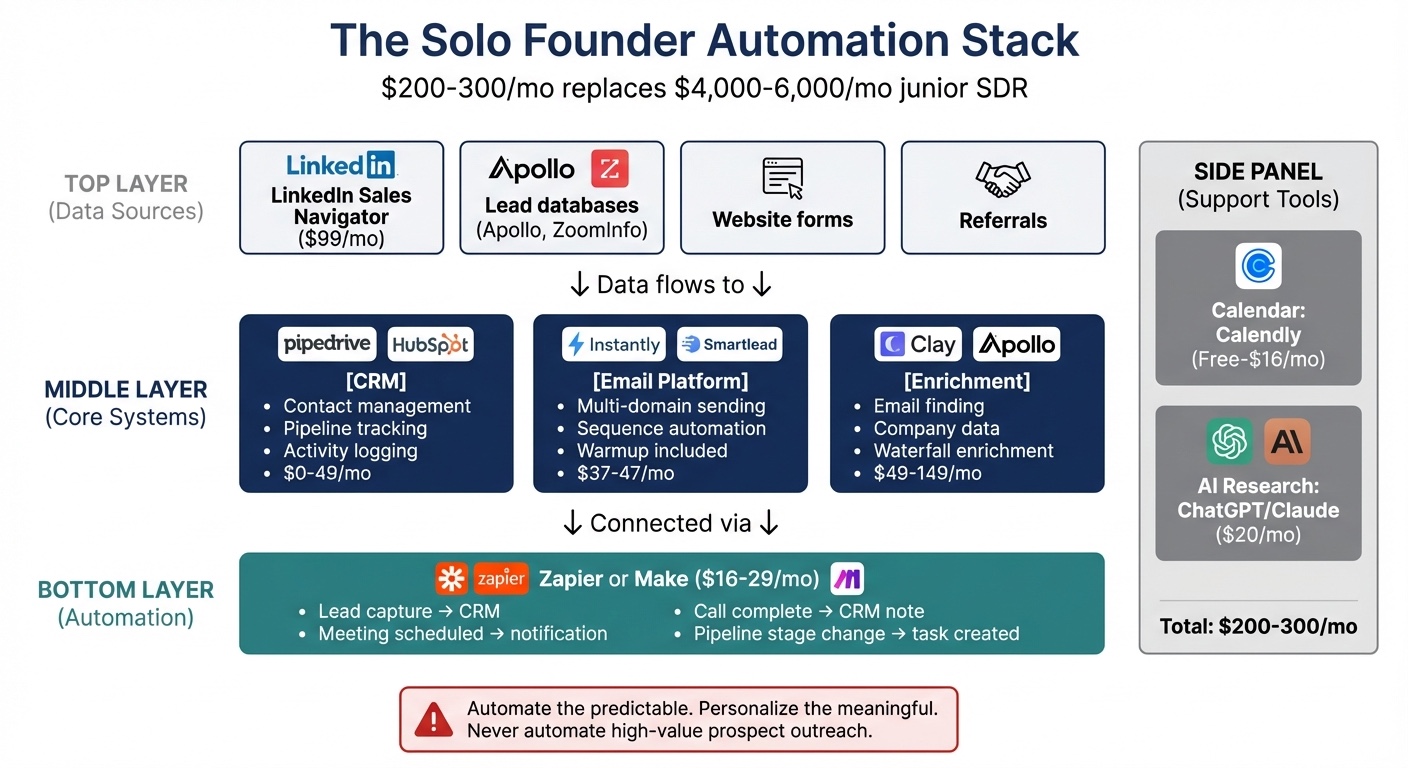
Figure 7.2: The Founder and Small-Team Automation Stack. The four core layers: CRM as single source of truth, email automation for sequences, calendar automation for scheduling, and workflow automation for connecting your tools. Each layer handles predictable tasks while preserving human judgment for relationship-dependent decisions.
A practical setup at the founder and small-team level looks like this. (When you make your first GTM hire, this same stack becomes the shared playbook a rep can co-own: the CRM and sequences move from your head into a system someone else can run.)
CRM: Your Single Source of Truth
You need one place where all your prospect and customer info lives, or you'll lose track of conversations and forget follow-ups. The main options:
Close or Pipedrive (entry plans from roughly $9-25 per user a month; Close's Solo plan is $19, or $9 billed annually, as of September 2026 [1]): Best for volume B2B sales: they auto-log emails and calls, track pipeline stages, and remind you to follow up. Close is especially good for founders who hate data entry.
Folk (from about $20 a month): Best for relationship-based rather than volume-based sales, designed for managing a network of contacts. The AI enrichment saves hours on research.
Notion or Airtable (free to about $20 per seat a month): Flexible, but it's easy to spend more time building the perfect CRM than using it. Use a template and resist endless customization.
AI-native CRMs (Attio, etc.): Built for GTM builders who want CRM, automation, and AI in one place: pulling data from email, product, and billing, running workflows, and letting you build custom apps inside the CRM instead of duct-taping tools together. Best if you want the CRM to run workflows as well as store records.
The rule: pick one, set it up in an afternoon, and use it consistently.
Email Automation: Sequences That Don't Feel Automated
Email sequences (automated follow-ups on a schedule) keep you persistent without manual tracking. Persistence matters: many deals need several touches before a reply, and most people give up after one or two.
Tools like Instantly ($47 a month, or $37.60 billed annually, as of September 2026 [2]), Smartlead (similar), or Lemlist handle the mechanics: scheduling, sending, tracking opens and replies, plus unlimited warmup and multi-domain support, both critical for deliverability. You still have to make the content sound like a person wrote it.
A bad sequence sends the same templated message to everyone. A good one has a personalized first email, follow-ups referencing your research, and a reason for each touchpoint beyond "just checking in." A structure that works:
- Email 1: Personalized intro referencing something specific (a post, job change, or announcement) with the value proposition in one sentence.
- Email 2 (3 days after email 1): Short follow-up adding one new piece of value: a resource or industry-specific insight.
- Email 3 (5 days after email 2, around day 8): Different angle: if email 1 was their problem, email 3 is a similar company you helped.
- Email 4 (7 days after email 3, around day 15): Direct ask: "Worth a 15-minute conversation, or should I stop reaching out?"
The final email gives the prospect permission to say no, which often prompts a response.
Marketing Automation and Nurture
Cold email handles outbound. Once people are in your world (newsletter subscribers, webinar attendees, content downloaders), you need nurture automation. Tools like HubSpot, ActiveCampaign, MailerLite, or Venturz handle newsletters, drip sequences, and basic funnels. The CRM tracks deals; marketing automation keeps warm leads from going cold. Start with your CRM's built-in email before adding a separate layer.
A note on the "AI SDR" category: tools like Artisan, 11x, and AiSDR promise autonomous outbound, but most automate only a slice (cold-email sequencing), are typically priced for funded teams, and depend on ICP fit, list quality, and deliverability far more than on the agent itself. For most founders and small teams, a deliverability-first email stack plus Clay-style enrichment outperforms a pricey "autonomous" SDR.
Calendar Automation: Remove the Friction
Scheduling calls by email wastes everyone's time. Use Calendly, Cal.com, or similar, and make the experience reflect your brand: clear instructions about the call, working time-zone detection, reminders that cut no-shows, and a brief pre-call questionnaire. Three questions work well: What's your biggest challenge right now? What have you tried? What would success look like? The answers let you prepare and show the prospect you did your homework.
Meeting recording: Record calls (with explicit permission) using Otter.ai, Fathom, Fireflies, or Zoom's transcription. Recordings help in several ways: review your own calls to spot where you rush or fumble objections (a quick way to improve discovery skills); have AI draft summaries you refine and send within the hour (the recap rule from Chapter 4); auto-populate CRM notes so you never lose details across long cycles; and analyze transcripts across many calls to find recurring objections and language that resonates with your ICP.
Always ask first: "I'd like to record this for my notes so I capture everything accurately, okay?" Most people agree once they know it's for your notes.
Workflow Automation: Zapier/Make for the Connections
Zapier and Make connect your tools so data flows automatically between them. Three workflows worth setting up:
1. The Lead Catcher: When someone books a call via Calendly or submits a form, automatically create a CRM contact and notify yourself. Speed to lead matters: in the Harvard Business Review lead study from Chapter 4, firms that tried to reach a web lead within an hour were nearly seven times as likely to qualify it as firms that waited even an hour longer [3].
2. The Meeting Logger: When a call ends (Zoom or Google Meet), create a CRM note with date and attendee names pre-filled. If you don't have to open the CRM, you're more likely to document the call.
3. The Follow-Up Reminder: When you move a deal to "Proposal Sent," create a task to follow up in three days if you haven't heard back. If you rely on memory, deals will stall.
One more thing: basic funnel metrics. Your CRM should show which sources and automations produce pipeline, beyond opens and clicks. If you can't see "LinkedIn outreach → booked call → closed deal," you're optimizing blind. These automations are unglamorous, but they eliminate dozens of small tasks that accumulate into hours of lost time.
AI for Research: Where It Helps
AI speeds up the research phase of prospecting. It's less useful for the communication phase.
What AI does well:
- Summarizing company info: Paste a website into Claude or ChatGPT for a summary of what they do and recent news, faster than reading it yourself.
- Finding patterns in your data: Upload your customer list and ask which traits your best customers share.
- Drafting first versions: AI drafts emails, proposals, and content, and editing a draft is faster than writing from scratch.
- Researching competitors: Ask AI to compare your product to alternatives or summarize competitor reviews.
- AI-personalized outreach: Enrichment tools like Clay use waterfall enrichment, querying data providers one after another until one returns a result, which finds more contacts than any single provider. AI can then draft first lines from recent posts or company news, which you edit before anything is sent.
What AI does poorly:
- Authentic personalization: It often reads as generic. "I noticed you went to Stanford, great school!" is a fact with no connection to why you're reaching out. Evidence on detection comes mostly from images: in Conjointly's September 2025 study, US adults identified AI-generated images correctly only 52% of the time, no better than chance, and the company concluded that attitudes toward AI content are becoming more skeptical [4]. Whether or not people can spot it, they are increasingly wary of it.
- Emotional nuance: AI can't tell when someone is politely saying no versus interested but hesitant.
- Relationship judgment: Follow up now or wait? Push back or let it go? These need human judgment AI can't replicate.
The human-in-the-loop principle: As of September 2026, the most effective approach is AI for research and first drafts, human decision-making on every high-impact step. Use threshold routing: let AI handle routine, low-risk work (logging data, drafting low-stakes follow-ups), but route uncertain or high-stakes outputs (new segments, pricing, commitments) to human review.
Practical application: Before every discovery call, paste the prospect's LinkedIn and company website into AI and ask: "What are the top three challenges this person likely faces?" The answers give you a starting point; the human work is deciding which are relevant and how to raise them.
A Real Workflow: Discover → Enrich → Analyze → Send
The specific tools matter less than the sequence. Any stack that can (1) discover, (2) enrich, (3) analyze with AI, (4) apply a human quality gate, and (5) send reliably will work. What follows is a tool-agnostic workflow you can adapt.
Case Study (AI-Powered Prospect Enrichment at Scale): Before launching GTM OS, I had tens of thousands of "interesting LinkedIn profiles" that needed to become a clean, verified outbound database. My 3-week discover → enrich → verify → personalize → human-review → queue workflow imported 58,605 leads across 37 lists and queued fully personalized campaigns for launch day. The 13 lists already enriched in Figure 7.3 returned 11,530 work emails from 24,945 members, about 46%.
Step 1: Discover your ICP in a list platform. Use LinkedIn Sales Navigator, Apollo, Clay, or similar to build searches matching your ICP: role, company size, geography, funding/bootstrapped signals, price band, buying triggers. Filter for recent activity ("posted in the last 30-180 days") so you only pull active people with content you can reference.
Step 2: Enrich with verified emails. Export lists into a contact enrichment tool that guesses company email patterns, validates via SMTP, and returns a clean CSV of verified work emails. Across those 13 lists, enrichment ranged from 28% to 71%, and the most tightly filtered lists came in highest, at 55-71%.
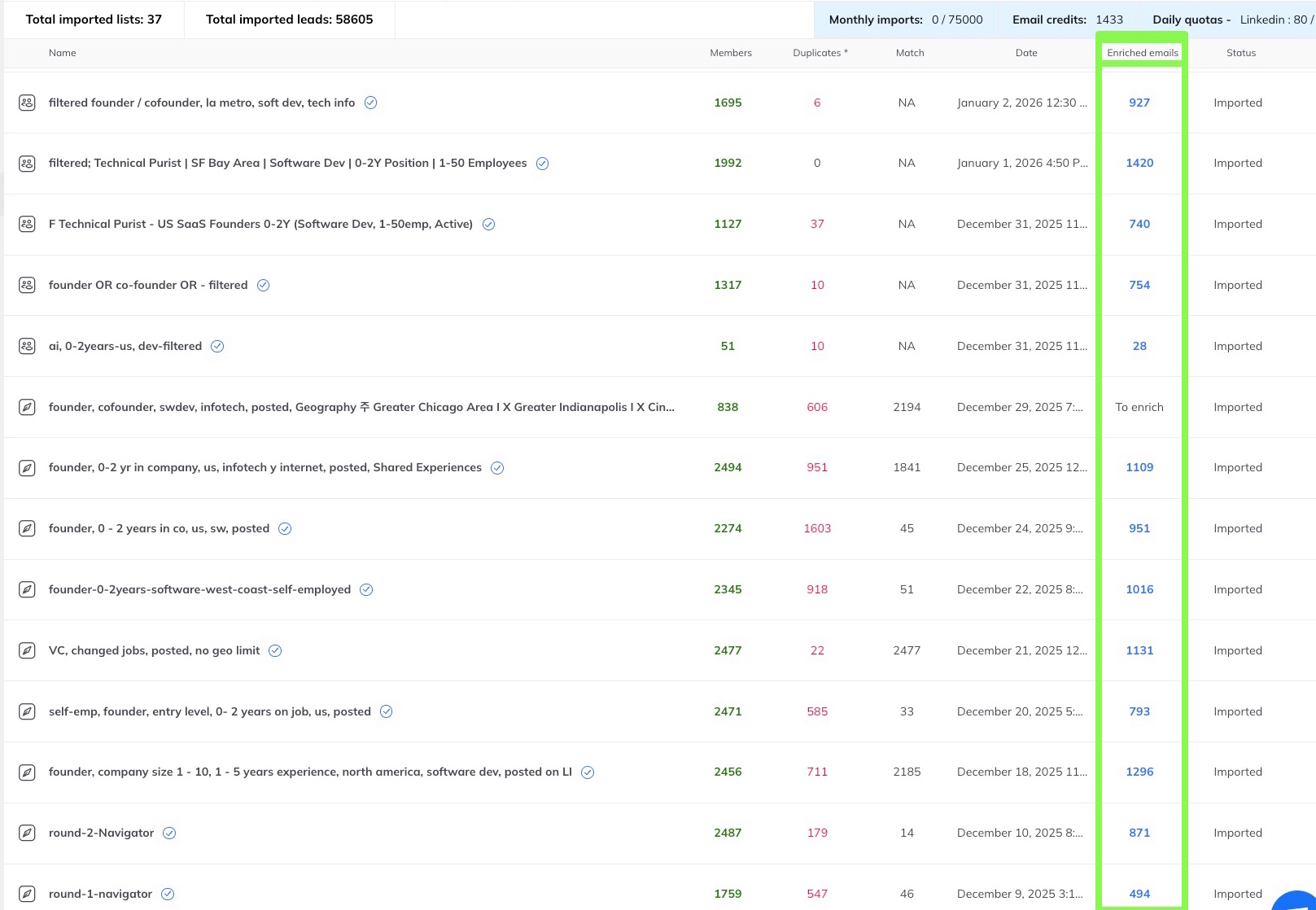
Figure 7.3: Email List Enrichment Results. 14 of 37 imported lists shown (58,605 leads in total). The 13 enriched lists returned 11,530 emails from 24,945 members (about 46%); the most tightly filtered lists reached 55-71%.
Compliance note: Use enrichment that relies on standard practices (pattern guessing + email verification) and avoid anything that violates platform terms. Treat "finding people" and "emailing people" as separate systems.
Step 3: Use AI to score and personalize at scale. Upload the enriched CSV into an AI batch processor (Gemini, Claude, ChatGPT) with your ICP definition, value proposition, any frameworks (e.g., DISC), and optionally your positioning docs. Have AI score each contact for ICP fit (1-10), flag founder/buyer signals, suggest a tentative communication style from the headline/summary (a starting guess to adjust once you're talking, never a label), pull personalization hooks (recent posts, role changes), and draft a first line tying their situation to your offer. AI is good at this part: working through thousands of rows and surfacing patterns you'd miss by hand.
Step 4: Act as the human quality gate. Don't ship AI output raw. Sort by ICP score, focus on the top bands, skim samples, and delete anything robotic or creepy. Adjust tone to how you speak; write the offer and CTA yourself. Your job is to edit the AI's first lines for the top bands you'll actually send, which is far less work than writing thousands of them yourself.
Step 5: Send through your cold email infrastructure. Import the AI-annotated CSV into your platform (Instantly, Smartlead, Lemlist), mapped to template variables like {{first_line}}, {{company}}, {{role}}. Let it handle warmed domains, SPF/DKIM/DMARC, 30-50 emails/day/inbox pacing, and follow-up sequencing. You're sending at system scale, but the emails still read like a human did the research.
Performance expectations: Any gain comes from sending more relevant emails. Stacking ICP-tight lists, verified data, AI-assisted personalization, and a human gate on solid infrastructure should lift replies on your best segments well above your generic baseline, but the size of the lift depends on your ICP and execution. Measure your own baseline first (Chapter 3 has the industry averages), then compare segments.
AI for Content and the Authenticity Trap
Content creation is one of the most time-consuming parts of building visibility. AI can help, but it introduces a specific failure mode.
Where AI helps: first drafts you'll heavily edit; repurposing (long post → tweet threads, video → blog post); outlines and research summaries; formatting and proofreading. Where AI fails: anything requiring your personal experience; technical content where accuracy is critical (AI hallucinates); content that needs to sound like you specifically; messages to high-value prospects.
Generic AI content that sounds like everything else gets ignored. As of September 2026, the content that works includes your own experience, which AI can't supply. "Here's how I lost my first customer" is interesting. "Five tips for customer retention" is not.
The authenticity test: If someone who knows you well read the content, would they recognize it as yours? If not, you've automated too much.
Case Study: Pieter Levels, solo at scale
Pieter Levels has designed, built, and run more than 40 startups, most of them by himself, including Nomad List and Remote OK; in a 2024 interview he put a single product, Interior AI, at roughly $40,000-50,000 a month [5]. He automates the infrastructure (APIs, auto-generated pages) while keeping his voice his own by building in public on X. Automate what doesn't need you, and keep your own time for writing and relationships.
Case Study: Building with AI, The Moat Problem
Digital Wellness Academy, a mental-health education platform I built with AI-assisted development, had early content that felt "too AI-generated" to providers. Provider feedback steered it toward more interactive, therapeutic content, a better fit. Lesson: anyone can generate content with public AI tools, so the value comes from the expertise and user feedback you apply to it, not from the AI output itself.
Answer Engine Optimization: Getting Cited by AI
In SparkToro's 2024 study, 58.5% of US Google searches ended without a click on any result [6], and that was before Google's AI Overviews rolled out widely; AI Overviews, ChatGPT, and Perplexity now answer many questions directly.
The goal now is to get cited. When someone asks an AI assistant about your topic, you want to be the source it references.
How to get cited by AI:
1. Answer questions directly in your first paragraph. Put the answer at the top; if it's three paragraphs down, an AI summary may miss it. Bad: "In this article, we'll explore the many benefits of cold email outreach..." Good: "Cold email still works when the list is tight and the first line is specific. Here's how..."
2. Use question-and-answer formatting. Questions as headers, direct answers as the first sentence, mirroring how people ask AI assistants.
3. Create original data and frameworks. AI tools need sources. Original research gives them something to cite, and a term you coin points back to your definition.
4. Get cited by other trusted sources. Mentions on Reddit, industry publications, or established blogs help AI "trust" your content.
Answer engine optimization adds a layer to traditional content marketing rather than replacing it. The fundamentals still matter, but now you also consider how machines read your content, alongside human readers.
The "Warmup" Automation Pattern
A useful pattern is to automate the warmup and keep the outreach itself manual. There are two separate motions: LinkedIn as a data source for cold email (the list → enrichment → AI → sending workflow), and LinkedIn as a conversation channel (DMs and comments). The warmup pattern applies to the conversation side.
Start smaller than you think. The weekly rhythm later in this chapter (20-30 people a week) assumes you have time to interact. If you're starting out, begin with 5-10 per week, manually, and learn what gets replies before adding automation.
On LinkedIn (relationship-first): Use Sales Navigator to build a small ICP-matched list. Warm them up by engaging with their posts: real comments, not "great post"; resharing with your perspective; answering questions they've asked publicly. Only after a few real touchpoints, send a short, human DM that references the interaction and invites a conversation or offers a resource. Keep the DM human-written; if you use AI, use it to draft options, then heavily edit so it sounds like you.
Tools like Dripify or LinkedHelper claim to automate the engagement phase, but LinkedIn's terms prohibit much of that automation and automated comments read as hollow, so keep engagement manual. The connection request and messages stay manual too. When your request arrives, they're more likely to recognize your name and accept it.
For cold email (list-building): Use Sales Navigator and tools like Kanbox purely to find and enrich leads. This step is data collection; the "warmup" here happens in the inbox through multiple respectful, relevant emails over time, not one blast.
To bridge the channels: Week 1, add to your cold email list and research; Week 2, engage with anything they post on LinkedIn; Week 3, send the first cold email, optionally referencing that engagement. It's slower than blast outreach and usually more effective per send.
My Automation Setup: What Works
The cold email infrastructure: Five domains, each with SPF, DKIM, and DMARC authentication, warmed for 3-4 weeks before real campaigns. Instantly (as of September 2026) handles warmup and sending, integrated with the CRM so responses flow back automatically. Volume: 30-50 emails/day per inbox, conservative enough for deliverability. At that pace, five inboxes send roughly 150-250 emails a day, so a list of 10,000 takes two to three months to work through, and you'll need a plan tier sized for that many contacts.
The LinkedIn prospecting rhythm: Monday, identify 20-30 prospects in Sales Navigator; Tuesday-Thursday, engage with their content (mostly manual, as automated engagement feels hollow); Friday, send connection requests. Follow-up DMs go out after they accept.
The research pipeline: Before every discovery call, run the same Claude prompts (summarize their LinkedIn, identify likely role challenges, note anything connecting to your solution) for a one-page brief. It takes about ten minutes, against an hour of manual research.
The follow-up system: The Zapier workflows above are failsafes so deals don't slip through the cracks. Add a "Negotiation" timer: if a deal sits more than a week, trigger a reminder.
What this costs: Not everyone needs every tool, and costs vary by volume. A realistic breakdown (September 2026):
- LinkedIn Sales Navigator Core (about $90-120/mo; see Chapter 2): Essential for ICP-targeted prospecting; one thorough month can yield 2-3 months of leads.
- Email enrichment: Kanbox or similar; pricing varies by volume.
- Cold email platform: Instantly Growth $47/mo, or $37.60 billed annually (1,000 contacts, 5,000 emails); Hypergrowth $97/mo (25,000 contacts, 125,000 emails) [2]. Add ~$12/year per domain.
- AI personalization: Gemini (free or $20/mo Pro) handles batch personalization, so no need for a paid enrichment platform like Clay if you're comfortable with CSV workflows.
- CRM: HubSpot Free works for most; Folk (from about $20/mo) or Pipedrive add features but aren't essential early.
- Workflow automation: Make or Zapier (roughly $10-30/mo), or skip if you use Gemini batches and self-hosted n8n.
A minimal stack (Navigator + Instantly Growth + Gemini free + HubSpot Free) runs roughly $130-170/mo plus enrichment; a fuller stack reaches $300-400/mo, still a fraction of the cost of human help. If you are still in the introduction's starting budget, begin with free LinkedIn search, Gemini free, and HubSpot Free, and add Navigator once you prospect weekly.
For technical founders who want maximum control and lower cost: Build a self-hosted stack with open-source tools: n8n for visual API workflows, or Trigger.dev to write workflows as async TypeScript inside your codebase, plus Supabase for storage. A VPS gives full ownership under $100/month versus $200-500+ for SaaS as you scale. But this makes sense only if you're willing to learn some infrastructure (AI tools make that far easier), have runway not dependent on acquisition working immediately, and don't mind ops work. For most founders and small teams, especially pre-revenue or time-constrained ones, the SaaS stack is the right answer. Don't let "I could build this myself" turn into another way to avoid selling.
In my own setup (part of "building in public," see Chapter 15), a single $50/month VPS runs Ghost, three NodeBB communities, Listmonk, n8n, plus databases via Coolify, where managed hosting would be $200-400/month with less control. I'm semi-technical, so I lean on an AI-enabled code editor or Perplexity Comet for config. You don't need to be an engineer; with AI-assisted workflows this path is within reach if you're willing to follow documentation. GTM OS itself runs on a separate VPS. My first host wasn't built for that kind of workload, and moving it was part of the learning curve.
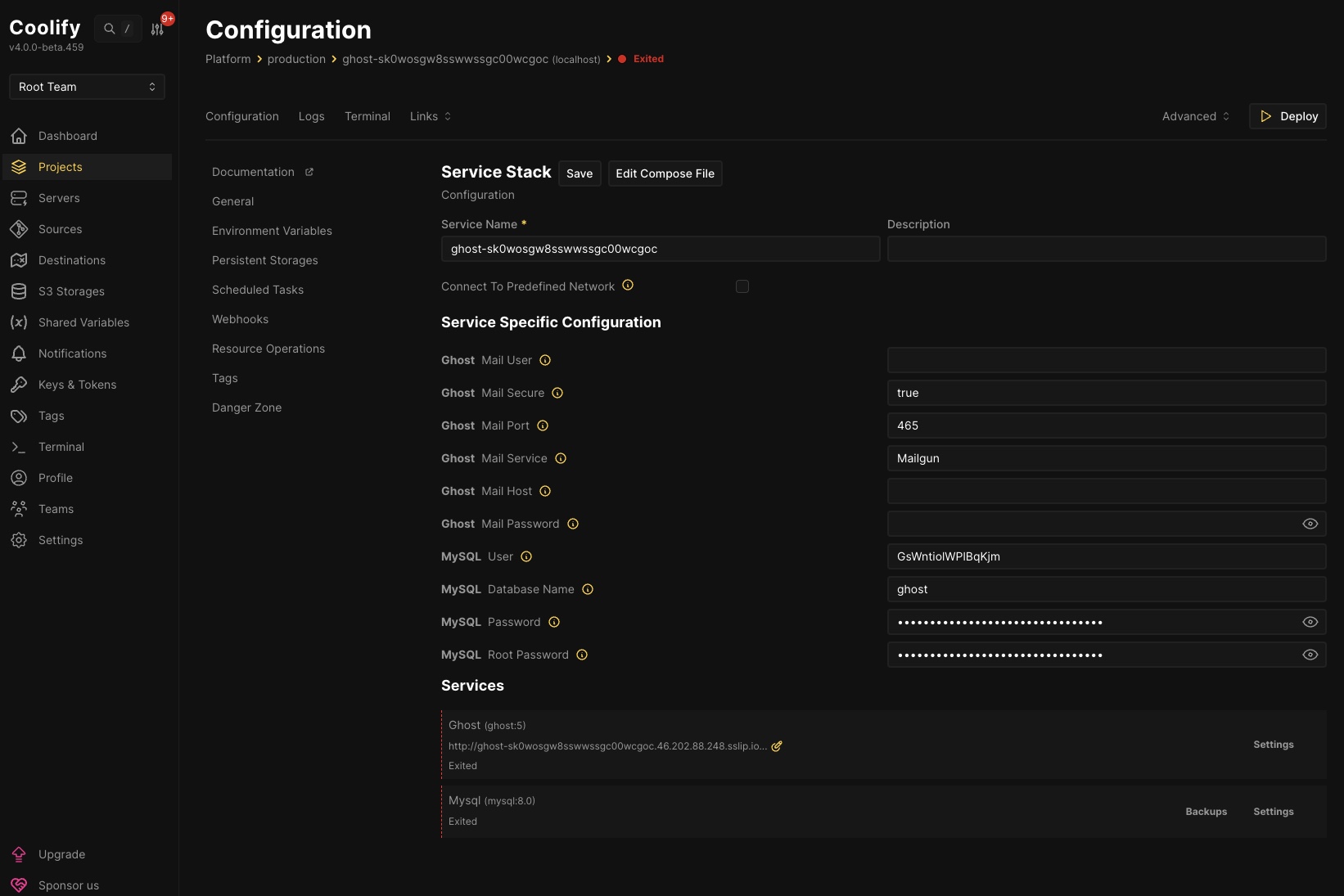
Figure 7.4: One VPS, many apps: Coolify turns a $50/month server into the equivalent of multiple managed SaaS subscriptions.
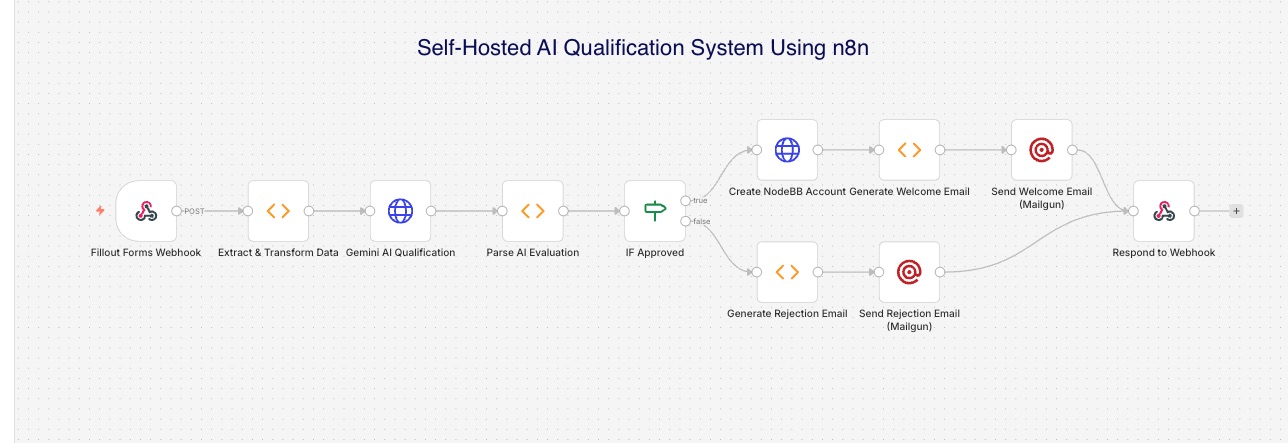
Figure 7.5: Self-Hosted AI Qualification System Using n8n. The workflow I first used for community applications: an AI model scores applicant fit, then the workflow creates the account and sends a personalized welcome email, or sends a rejection email. I have since moved the same logic into a small forms app on my own server that calls the model through OpenRouter and sends email through Resend.
Cross-Reference: This system borrows MVQ's logic (is there a real need, and will membership help?) to screen applicants at scale. As built, it sends rejections automatically. If you build one, apply this chapter's threshold-routing rule and send borderline scores to yourself before any rejection goes out.
Time Allocation: 5-7 Hours Per Week
How should you allocate your 5-7 weekly customer-acquisition hours when AI handles the predictable work?
- Outreach and follow-up (2-3 hrs/wk): Review responses, send personal replies, execute outreach. AI compiles research, schedules sequences, triggers reminders.
- Content and visibility (1-2 hrs/wk): Create one piece of content or engage in communities. AI drafts outlines, repurposes formats, researches topics.
- Calls and relationships (1-2 hrs/wk): Discovery calls, follow-ups, check-ins. AI briefs you pre-call and drafts post-call summaries.
- Admin and maintenance (30 min/wk): CRM cleanup, review automation performance. AI handles logging, reminders, aggregation.
The 60/40 principle: roughly 60% of your time goes to human work (conversations, relationship-building, judgment) and 40% to reviewing and directing automated work. The total hours stay about the same, but more of them go to revenue-generating work and less to admin.
Chapter Summary: TL;DR
The core insight: Automate the predictable, personalize the meaningful. Personalization is primary; automation is secondary support. Aim for maximum leverage on limited time, with authentic human connection intact, rather than maximum automation.
Key takeaways:
- Automation handles the predictable work for a few hundred dollars a month, a fraction of the cost of hiring an SDR
- A minimal stack (Sales Navigator, a cold-email platform, free AI and CRM tiers) runs roughly $130-170/month plus enrichment
- AI does the research and first drafts; a human edits every message that matters
- Never automate: first messages to high-value prospects, responses to replies, judgment calls that require reading the room, content in your own voice, key customer-success moments
- 60/40 rule: 60% of your time on human work (conversations, judgment), 40% on reviewing and directing automation
- People are growing warier of AI-made content, so keep your own voice in what you send
Next chapter: Chapter 8 covers the metrics that tell you whether your system is working and where to focus.
The Exercise: Build Your Starter Stack
Before moving on, set up the minimum viable automation stack for your sales process.
- Choose your CRM. Pick from this chapter's options and set it up this week. Use a template; don't over-customize.
- Set up calendar automation. Get Calendly or similar running, with a discovery-call booking page and brief pre-call questionnaire.
- Build one Zapier/Make workflow. Start with the Lead Catcher: form submission or booking → create CRM contact + notify yourself.
- Define your AI research process. Write out the prompts you'll reuse to research prospects.
- Identify your "never automate" list. Write down the activities you'll keep manual no matter what.
Chapter Checklist
Before moving to Chapter 8, complete:
- Chosen and set up your CRM (Folk, HubSpot Free, Pipedrive, or Attio)
- Set up calendar automation with pre-call questionnaire
- Built one automation workflow (form submission → CRM contact + notification)
- Written your AI research prompts for prospect research
- Defined your "never automate" list
- Documented your current time allocation (human vs. automated tasks)
Self-assessment questions:
- Am I automating for leverage or avoiding human connection?
- Do my automated messages still sound like me?
- Have I validated my approach manually before scaling with automation?
- Is my 60/40 time split protecting space for relationship-building?
[1] Close pricing, accessed September 2026: Solo $19 per user a month, or $9 billed annually; Essentials $49, or $35 billed annually. https://www.close.com/pricing
[2] Instantly pricing, accessed September 2026: Outreach Growth $47/month or $37.60/month billed annually (1,000 contacts, 5,000 emails); Hypergrowth $97/month (25,000 contacts, 125,000 emails). https://instantly.ai/pricing
[3] Oldroyd, J. B., McElheran, K., and Elkington, D., "The Short Life of Online Sales Leads," Harvard Business Review, March 2011. https://hbr.org/2011/03/the-short-life-of-online-sales-leads
[4] Conjointly, "Can consumers distinguish between real and AI images in 2025?" September 2025 (301 US adults). https://conjointly.com/blog/real-vs-ai-images-2025/; announcement and quote: https://conjointly.com/blog/real-vs-ai-images-study-2025-announcement/
[5] Lex Fridman Podcast #440, "Pieter Levels: Programming, Viral AI Startups, and Digital Nomad Life," August 2024. Transcript: https://lexfridman.com/pieter-levels-transcript/
[6] Fishkin, R., "2024 Zero-Click Search Study," SparkToro, July 2024 (Datos clickstream panel, US and EU). https://sparktoro.com/blog/2024-zero-click-search-study-for-every-1000-us-google-searches-only-374-clicks-go-to-the-open-web-in-the-eu-its-360/